On-device Gemma 4: cutting latency from 54 seconds to under 8
Originally published on my old blog. For the story behind Luca, see A local LLM for my parents’ phone.
I recently had fun taking part in the Gemma 4 hackathon on Kaggle, building Luca:
Luca is a Gemma-powered accessibility assistant. Gemma 4 is used as the reasoning layer over curated Android accessibility context. To make on-device interaction usable, Luca combines Gemma with structured perception, compact prompts, local ID mapping, deterministic safety checks, and immediate spoken feedback.
One of the main challenges of running an offline LLM like Gemma on a low-to-mid-range phone CPU was latency: every query to the model was slow.
I’m going to give away the result first: the slowest prompt I measured took 54 seconds, and the ultra-compact one the new design is built on took about 7.9 seconds. Gemma stays central for reasoning, and the latency goes down in four ways: compact inputs, minimal outputs, immediate spoken feedback and, later, a separate path for simple commands that don’t need the model at all.
How I got there: the original architecture put Gemma on the critical path too often, first to route the user’s transcript and then again to reason over the screen. Manual measurements showed that was too slow for a voice assistant.
A note on names: I built Luca in milestones. M1 used a keyword-based planner, M2B added a Gemma router in front of the screen reasoning, and M3 is the latency-first redesign described below.
Table of contents
- The problem
- What I measured
- What the numbers taught me
- What I’ve changed so far
- The M3 design: latency first
- Why not a local command matcher right away?
- The fast path: deferred, but probably needed
The problem
Luca is meant to help elderly or non-technical people use their phone, so the experience depends on quick spoken feedback. A 10 to 15 second silence after a simple command feels broken, even if the model eventually returns the correct JSON.
The M2B design sent every turn through a text-only Gemma router before looking at the screen. The router decided whether the utterance was a local tool, a screen question, a general answer, or needed clarification. That was clean architecture, but it put Gemma on the critical path for commands that should be nearly instant, like changing language or moving the assistant bubble.
Problem: the user doesn’t care that the internal routing is clean. If Luca waits 13 seconds before saying “Certo, parlerò in italiano”, the command feels unusable.
What I measured
These numbers come from manual tests, on the device and in Google’s AI Edge Gallery app (it runs models like Gemma on device), while I was iterating on the router and screen-reasoning prompts. Exact timings vary by device and backend, but the pattern was consistent: prompt size, output size and waiting for the complete JSON dominate perceived latency.
| Experiment | Scenario | Observed result | Conclusion |
|---|---|---|---|
| M2B router before compact optimization | “speak Italian” in app | router_inference_ms ≈ 14,747; turn_total_ms ≈ 14,955 | The tool itself took milliseconds; the Gemma router dominated. |
| M2B compact router after optimization | “speak Italian” in app | router_inference_ms ≈ 12,724; turn_total_ms ≈ 12,894; prompt ≈ 1,047 chars; output ≈ 42 chars; max tokens 64 | The compact prompt saved only ~2 s; still too slow for local commands. |
| Realistic text-only router prompt | Edge Gallery | ≈ 27 s to complete the JSON | The issue wasn’t only the app: realistic JSON routing is expensive. |
| GPU backend | Edge Gallery, GPU | Invalid, corrupted output | Not a usable fix: the output degenerated into nonsense. |
| Rich UI tree + OCR anti-scam prompt | Edge Gallery | 54 s, and a schema violation (target returned as a string) | Too slow and not reliable enough for a synchronous default. |
| Medium compact screen map | Facebook “save post” | ≈ 26 s | Better than the rich prompt, still too slow for frequent UI help. |
| Ultra-compact UI target prompt | Element list only, minimal JSON | ≈ 7.9 s | The best Gemma path I measured; it still needs a progress cue, but it’s usable in a demo. |
What the numbers taught me
- In my opinion, Gemma shouldn’t be the event loop. It’s useful for reasoning, resolving ambiguity, explaining the screen and judging safety, but it shouldn’t be called for every small routing or settings decision.
- Prompt size matters more than I expected: roughly 54 s for the rich prompt against roughly 8 s for the ultra-compact one. That’s why M3 uses compact screen maps instead of raw UI trees.
- Output size and schema complexity matter too. Luca can’t safely act until the whole JSON object is generated and parsed, so even if the model starts producing tokens early, the app waits for the end. A smaller JSON finishes sooner.
- Streaming can fool you. In Edge Gallery you watch the text stream in, which makes the model feel faster than it is. Luca can’t run a tool or highlight a target until it has valid structured output, so full-output latency matters much more than time to first token.
- Immediate feedback changes how long the wait feels. When a screen task really needs Gemma, Luca should say “Sto controllando lo schermo…” (“Checking the screen…”) right away and keep working, instead of leaving the user in silence.
What I’ve changed so far
| Change | What changed | Why it matters |
|---|---|---|
| Compact M2B router prompt | Smaller router prompt and JSON output; maxOutputTokens set to 64. |
Slightly lower latency and less output to parse. |
App discovery through the Play Store (find_app) |
Launcher and Play Store options collapsed into one app route. “Open/search app” now opens the app’s Play Store page or a search, and tells the user to press Open or Install. | Gemma no longer chooses between launcher flows that differ by device. The Play Store looks the same on every Android phone, and the wording stays honest. |
GemmaReasoner cleanup |
The screen reasoner no longer picks local tools; tool_request is forced to null and ignored. |
Two prompts no longer compete to decide tools. |
| Prompt ownership refactor | Gemma prompt builders moved into assistant-gemma; the app/session layer orchestrates. |
Cleaner module boundaries. |
| Session and TTS locale fixes | The TTS locale is reapplied on activation; no hardcoded English follow-up in GemmaReasoner. |
No more Italian text read with an English voice, or the other way round. |
| Explicit M2B observation request | The screen-context route drives an explicit ObservationRequest; the M1 keyword planner is bypassed. |
The old keyword classifier can’t override M2B routing anymore. |
The M3 design: latency first
M3 starts from structured perception, a compact screen map (point 2 above) and minimal output by default (point 3). The raw accessibility tree and OCR data stay inside the app. Gemma gets a compact representation with stable IDs and returns a target_id, never coordinates.
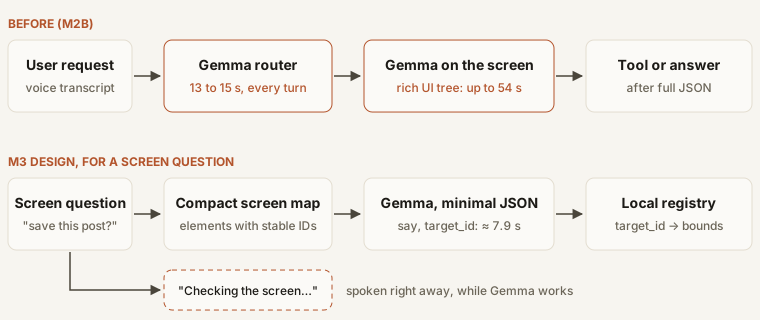
Little example: here’s what Gemma sees when the user asks “How do I save this post?” on the Facebook feed.
Visible text:
- T1 Facebook
- T2 Anna Bianchi
- T3 A beautiful walk in the park today
- T4 Like
- T5 Comment
- T6 Share
Interactive elements:
- E1 Search
- E2 Messenger
- E3 Create post
- E4 Post author profile: Anna Bianchi
- E5 More options for this post
- E6 Post image
- E7 Like
- E8 Comment
- E9 Share
And it must return only this JSON:
{"say":"short answer","target_id":"ID or null","confidence":0.0}The app keeps a target_id -> source -> bounds registry internally. If Gemma returns target_id = E5 with high enough confidence, Luca maps E5 to its bounds locally and highlights the right element. So in the common case Gemma never has to generate coordinates.
Why not a local command matcher right away?
A local, high-confidence matcher would make common commands faster, but it brings its own risks: language coverage, false positives and brittle keyword logic. “Open Facebook” and “how do I open a bank account?” both contain “open”, and only one of them is an app command.
So the plan is to make M3 efficient first. If M3 plus the compact router is still too slow, I’ll add a conservative HighConfidenceIntentRouter, or static command shortcuts with strict gates.
The two layers solve different problems: compact screen maps make Gemma faster when screen reasoning is needed, while a static command layer skips Gemma only for actions that need no reasoning at all: language, moving the bubble, trigger selection and app discovery.
The fast path: deferred, but probably needed
I think the fast path needs strict slot and gate rules instead of broad fuzzy matching: it should prefer false negatives over false positives, and anything uncertain falls back to Gemma.
| Intent | Required gates | Positive examples | Negative examples |
|---|---|---|---|
language_change |
language-change phrase + supported language | “speak Italian”, “parla italiano” | “speak about Italy”, “Italian restaurants” |
move_overlay |
movement intent + Luca/bubble context + position | “move to the top right”, “spostati in basso a destra” | “move the photo to the top right” |
find_app |
open/find/search verb + recognized app entity | “open Spotify”, “cerca YouTube” | “open a bank account”, “open source software” |
screen_context shortcut |
explicit screen, message, button or safety anchor | “where do I press?”, “is this message spam?” | “what should I do?” with no screen anchor |
So, in short: Gemma stays at the center of Luca, and the work is in deciding when to call it: with the smallest prompt that’s enough, for an answer that’s as short as possible, and never for a command a strict rule can recognize on its own.
Thanks for reading!