Introducing aZenda, yet another task manager
I built my own task manager, and this post introduces it: aZenda, a task manager with a method built in and an assistant that runs the reviews. The code is on GitHub.
Table of contents
- Why another task manager
- The idea
- The model
- The review becomes a queue
- Priority is derived
- The assistant is yours
- What I cut, and why
- Where it stands
Why another task manager
Building a task manager is a meme at this point: every developer ships one, and every one is a slightly different box for the same tasks. So, why another one?
I love Todoist. I have used it for years and I am not leaving it out of spite. For the last two months I have run a fairly strict system on top of it: every project has a measurable target and a definition of done, one sprint at a time, backlogs reviewed monthly, and two labels to say what I look at next. I think the system is good. What Todoist doesn’t give me is support for keeping it, and that is the one thing I wanted.
It failed in three ways, always the same three:
- The monthly review never happened. I booked a slot in my calendar, and when the time arrived I was mostly not available, so I postponed it, again.
- Backlogs grew without anyone noticing, because a task that sits in a list for four months looks exactly like one added yesterday.
- The same handful of tasks got rescheduled every week, which is the polite way of never doing them.
Todoist is a neutral container, and that is a feature: it will hold any method. It just enforces none, and mine needed a hand. That can lead to a mess (it did, in my case), and mess turns into stress.
Zen is one thing at a time, attention on what is in front of you, and letting go of what you don’t need: that is the whole method behind aZenda. A goal gets a date only when I commit to it, an iterative review that flags hanging tasks, and a process where deleting is as normal as keeping. The agenda stays calm, and so do I!
The idea
aZenda does everything a task app does. On top of that, it turns stale items, repeated reschedules and missed deadlines into small daily decisions, gives a goal a deadline only when you commit to it, and exposes its data to your own AI assistant so the review actually gets done.
The first draft of this idea was harsher: hard caps on backlogs, at most five tasks in focus, no project without a deadline. I cut all of that (more on why below). What survived is guided: the app makes the mess visible and adds friction where it matters, but it never blocks you and it has no numeric limits. My reasoning: the moment a limit gets in the way, people route around it, and I think a rule people route around is worse than no rule.
The model
There is one kind of container, and it nests. A container with a target (a measurable result: “2 interviews scheduled”) and a definition of done (what must be true to close it) is a project. Without them it is a list, a scoped group of tasks. Add the two fields to a list and it becomes a project; remove them and it goes back. The old rule still holds: if you can’t write a target, it isn’t a project.
A project gets an end date when I commit to it, and the end is the only place where a target gets a deadline. An optional start makes it planned until that day, otherwise it is active. More than one project can be active: looking for a job and preparing a marathon happen in the same weeks, and the race has its date whether I like it or not. Tasks can carry dates anywhere (a dentist appointment doesn’t care about your projects), but a goal only gets a date when you have decided to push it.
Projects without dates live in Someday maybe, so I don’t have them in front of me all the time. Give one an end and it moves to the top level; remove the end and it goes back. That happens only when the dates change, so if I move a project by hand afterwards, it stays where I put it. Children of a project are its supporting sub-projects and sub-lists, as many as you like, and they follow their parent: they run when the parent runs.
Closing a project asks you to confirm the definition of done, then moves it to Proud of, grouped by year. A closed project doesn’t reopen: its target was met, so a new goal is a new project.
Two built-in labels say when you look at something, while the list says how committed you are: next means the next free slot, radar means soon, but not clear when.
The review becomes a queue
The monthly review (point 1 above) is gone. In its place there is a queue of decisions, filled by rules that run on the data you already have:
- an item sits in the Inbox for 15 days
- an item in a list has not been touched for 60 days
- a task has been rescheduled twice
- a task has been on
radarfor 30 days - a target deadline has passed
Each matured item becomes a card with three or four buttons: keep, next, radar, drop the date, move it, delete it. Deleting is a first-class option, as normal as the others. Today shows three cards a day, which takes about a minute. When more than ten pile up, the app offers a review session: every card grouped by container, a visible 15-minute timer, and you stop whenever you want.
Rescheduling escalates, which is the answer to point 3. A task you moved twice isn’t asked for a third date; it is asked whether it should become next, go on radar, or lose its date. So the queue is what the review used to be, spread over the days when you would have skipped it.
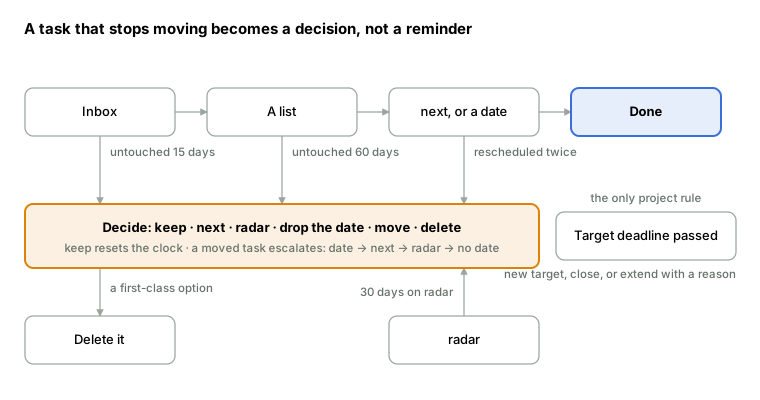
The top row is the normal life of a task. Anything that stops moving drops into the orange band and asks for one decision: “keep” resets its clock, the rest move it along or out.
Priority is derived
I never managed to assign P1 to P4 honestly. I think “important” is the part nobody can really answer, which is why every task ends up P4 or every task ends up P1. So aZenda doesn’t ask for a priority. It asks two questions that can be answered in five seconds: is there a real deadline? and what happens if this never gets done? (serious, mild, nothing). The priority falls out of the answers:
- a real deadline with serious consequences is P1
- one of the two is P2
- mild consequences and no deadline is P3
- nothing is P4
Priority is also optional, and a task without one is fine. The questions come up during the review, or when a task enters an active project, and the assistant can ask them for you.
next and radar are scheduling, separate from priority. Little example: a five-minute chore goes on next with a P4, because getting rid of it is worth the slot.
The assistant is yours
For the last few weeks I had been connecting Claude to my Todoist and asking it the review questions: what is old, what is duplicated, is this target real. That worked better than any filter, so I built it in, but without a chat box inside the app: aZenda ships an MCP server. You point the assistant you already pay for (Claude, ChatGPT, whatever speaks MCP) at http://localhost:3001/mcp, and it gets ten tools and one prompt.
The tools are the review: get_decisions returns the queue, decide applies an action to one item, set_priority takes the two answers and derives the priority, merge_tasks folds a duplicate into the task you keep, and update_project refuses dates on a list. The review prompt explains the method to the assistant: propose one action per decision and ask before applying it, refuse vague targets and suggest a measurable version, never guess a P1 to P4.
This is the part I care about most. The rules engine finds what is old and what moved twice, and that needs no model. Judging whether “find a job” is a target, or whether two tasks are the same thing, does. Splitting it this way keeps the app usable with no API key at all, and lets the assistant improve without me touching the app.
A per-container privacy switch, so that some lists never reach a prompt, is on the list and not built yet.
What I cut, and why
The first roadmap read like a list of prohibitions. Every one of them died in a two-hour design session where I played the user.
| Rule | Why it went |
|---|---|
| Hard cap on backlogs (20 items) | The user makes a second list, so the cap just moves the mess somewhere else. |
At most five next tasks |
Five of what? Five five-minute chores are not five afternoons. |
| Every project needs a deadline | I can have ten projects ready and not know when I will start them. Only the ones I have committed to have a date. |
| At most three active projects | A job search and a marathon are both active, and they don’t weigh the same. If too many pile up, the review is the place to notice it. |
| Sprints | One sprint at a time survived the design session, and not much longer (!). A job search and a marathon run in the same weeks, and the race has a fixed date: with one sprint, giving the marathon its deadline meant pausing the job search. Then I noticed that a sprint was just a pair of dates on a project, so I kept the dates and dropped the word. |
| A separate “workbench” container | It was a list with a fancier name. Nesting covers it. |
| No fake dates | Not a rule you can check. If the flow works, nobody needs a fake date: an undated task always has a home and a moment when it is looked at. |
What is left is small: a list can’t have dates, and closing asks for the definition of done. Everything else is visibility and friction. I think that is the honest amount of opinion a task manager can hold before it starts lying about how people work.
Where it stands
Everything above, apart from the privacy switch, is built and runs on my machine:
- React 19 and TypeScript in front
- a small Node API behind (Hono,
node:sqlite, no build step thanks to Node 24 type stripping) - the MCP endpoint on the same server
- a one-shot Todoist importer, so I can move my own system over
Single user, no auth, 33 tests. The rules module is shared between the browser and the server, so the cards in the app and the queue the assistant sees are computed by the same code.
Not done yet: recurring tasks and subtasks (needed for the project checkpoint), a per-container privacy switch for the assistant, the open-task trend over time, and running the importer against my real account. The next real test is a month of using it instead of Todoist, with the review done by Claude over MCP, and watching whether the single metric I care about, the number of open tasks, goes down.
If you have a system that your task manager keeps letting you break, I’d like to hear which rule you would want built in, and which one you would route around.
Thanks for reading!