Configuring email to RSS
For a while now I’ve wanted every source I follow to land in one reader I control: my own FreshRSS instance on my VPS. This post is about the step that turns email newsletters into RSS feeds. I’m going to give away the result first: the pipeline runs end to end (Gmail → mail2rss → FreshRSS, all on my own server), and the rest is how I got there.
Table of contents
- Why: one place for all my news
- The newsletters
- Architecture: a dedicated inbox in the middle
- Google Cloud setup, and why each piece is there
- The script: mail2rss
- Running it on the VPS
- What’s next
Why: one place for all my news
Blogs and sites already speak RSS, but a lot of the good stuff only arrives as email newsletters.
So the goal of this step is simple: turn a handful of newsletters into RSS feeds, without handing my inbox to a third-party service. Hosted tools like Kill the Newsletter solve exactly this, and they are great, but someone else still receives and stores my mail. I’d rather build a small mail-to-feed script on my own server.
The newsletters
Four newsletters, none of them with a usable RSS feed:
| Newsletter | Sender | Topic |
|---|---|---|
| The Batch (DeepLearning.AI) | thebatch@deeplearning.ai | AI |
| The Bull | newsletter@thebull.it | Finance |
| The Intelligent Investor (WSJ) | access@interactive.wsj.com | Finance |
| IoInvesto | team@ioinvesto.net | Finance |
The Batch does have an unofficial, community-scraped feed on GitHub, but it depends on someone else’s scraper staying alive. The email is the canonical version, so I take it from there.
Architecture: a dedicated inbox in the middle
I keep every subscription on my main Gmail, and a filter there auto-forwards those senders to a second account created only for this: [myanonymousaccountfirstpart].newsletters@gmail.com. The script on my VPS reads that second account, and nothing else.
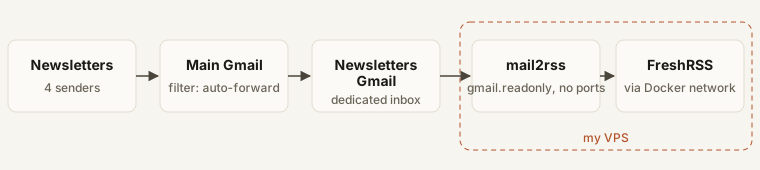
There are two reasons for the extra hop:
- Smaller attack surface. The script holds an OAuth token, and a token on a server can leak. If it does, an attacker can read my newsletters but not my personal mail (it’s just least privilege, applied to a mailbox).
- The subscriptions survive the experiment, because they stay on my main account. If I lose the dedicated account, or scrap the whole project, I don’t lose the newsletters: I delete one filter and they’re back in my main inbox.
Bonus: since I’m only forwarding, I didn’t have to re-subscribe to anything.
Google Cloud setup, and why each piece is there
The script reads mail through the Gmail API with OAuth, instead of IMAP and an app password. An app password is a full-access credential to the mailbox, while OAuth lets me ask for read-only access and revoke it at any time. The price is some Google Cloud configuration:
- A Cloud project (
mail2rss) with the Gmail API enabled. The project is just the container for the app’s identity. I created it with my main account, and that’s fine: owning the project gives no access to any mailbox. Access comes only from the account that clicks “Allow” during the OAuth flow, which is the newsletters account. - An OAuth consent screen, audience External. “Internal” exists only for Google Workspace organisations, so a personal Gmail has to be External.
- One scope:
gmail.readonly. It’s the minimum that lets the script read message bodies: no sending, no deleting, no labels. - A test user: the newsletters account. New apps start in Testing, where only listed accounts can grant consent.
- An OAuth client of type Desktop app. The script has no web server to receive a redirect, so the first consent runs once in my laptop’s browser, and the resulting token is copied to the VPS. The client secret is shown only at creation, so I downloaded the JSON straight away, and I keep it out of any repo.
Problem: in Testing, Google expires refresh tokens after 7 days, so I’d have to redo the consent every week. Publishing to Production removes that, but then Google wants a home page, a privacy policy and an authorised domain on the consent screen, because in Production any Google user could authorise the app, and Google wants them to know who’s asking. For a one-user tool that’s a bit absurd (but it’s the price of OAuth). I’m staying in Testing while I build the script, and I’ll publish later with a minimal page. An unverified app is fine for personal use: verification (paid, for restricted scopes like this one) is only needed if you go public.
It costs nothing: the Gmail API is free, and a few newsletters a day are orders of magnitude under the quotas.
The script: mail2rss
mail2rss is a small TypeScript script. Every run, it reads the last 30 days of mail from the newsletters inbox and writes one Atom feed per sender: one file per newsletter, one entry per issue.
| Feed entry | |
|---|---|
| Sender address | which file it lands in, e.g. newsletter-thebull-it.xml |
| Sender name | feed title |
| Subject | entry title |
| Date | entry date |
| Message-ID | entry id |
| HTML body | entry content |
The Message-ID is what makes it stateless. With a read-only scope the script can’t mark mail as read, so it doesn’t try to remember anything: every run rebuilds the feeds from scratch. The Message-ID is unique and stable, so FreshRSS recognises the entries it has already seen and only shows the new ones.
It’s built on googleapis for Gmail, mailparser for MIME and feed for Atom. To check the output, I fed a generated feed to SimplePie, the same parser FreshRSS uses.
Problem: the first real run failed with a 401 “Login Required”. Google’s local-auth helper, which runs the browser consent, ships an older google-auth-library (v9) than the one googleapis depends on (v11). The client it returns isn’t recognised, so requests go out with no Authorization header at all. The type checker had flagged it, and I had silenced it with an as any… Lesson relearned: a cast that silences a type error is usually hiding exactly this kind of bug.
Running it on the VPS
On the server, mail2rss is one Docker container, started with Docker Compose next to FreshRSS. It rebuilds the feeds every hour and serves them over HTTP. If a build fails, for example because the token expired, the error goes to the logs and the last good feeds keep being served.
The feeds get no public URL, because they contain my newsletters (paywalled ones included), plus unsubscribe and tracking links tied to my address. So the container publishes no ports: it joins the Docker network FreshRSS already lives on (freshrss_default), and FreshRSS subscribes to http://mail2rss:8080/<sender>.xml. Nothing outside the box can reach them, and as a bonus there’s no reverse proxy, domain or TLS to configure. The server only accepts plain name.xml file names, so there’s no path traversal out of the feeds folder.
The consent flow needs a browser, so I ran it once on my laptop and copied the resulting secrets/ folder to the VPS with scp. The token never lives in the repo.
There were two small snags along the way:
- Cloning a private repo. GitHub no longer accepts passwords for git, so instead of a personal token I added a deploy key: an SSH key that can read this one repository and nothing else.
- File permissions. The secrets are
chmod 600, owned by my user on the VPS (uid 1001), but the Node image runs as uid 1000, so the container couldn’t read them. The fix: run the container as my uid, and keep the generated feeds in a tmpfs, since they’re rebuilt on every start anyway.
Final bit: the last step is manual and happens once per newsletter. When its first issue arrives, I add its feed URL in FreshRSS, in the category I want. From then on it’s automatic.
What’s next
The pipeline works, but a few things are still open:
- Production on Google. In Testing mode the token expires after 7 days, so for now I redo the consent once a week. Publishing the app needs a small public page, which I’ll host on nerdstuckathome.com.
- The first real issues. The feeds appear as the newsletters arrive, and I’ll see how each one’s HTML renders in FreshRSS.
- Tracking pixels. Newsletters embed them, so opening an issue in FreshRSS still tells the sender I read it. Stripping them is a possible next step.
Thanks for reading!